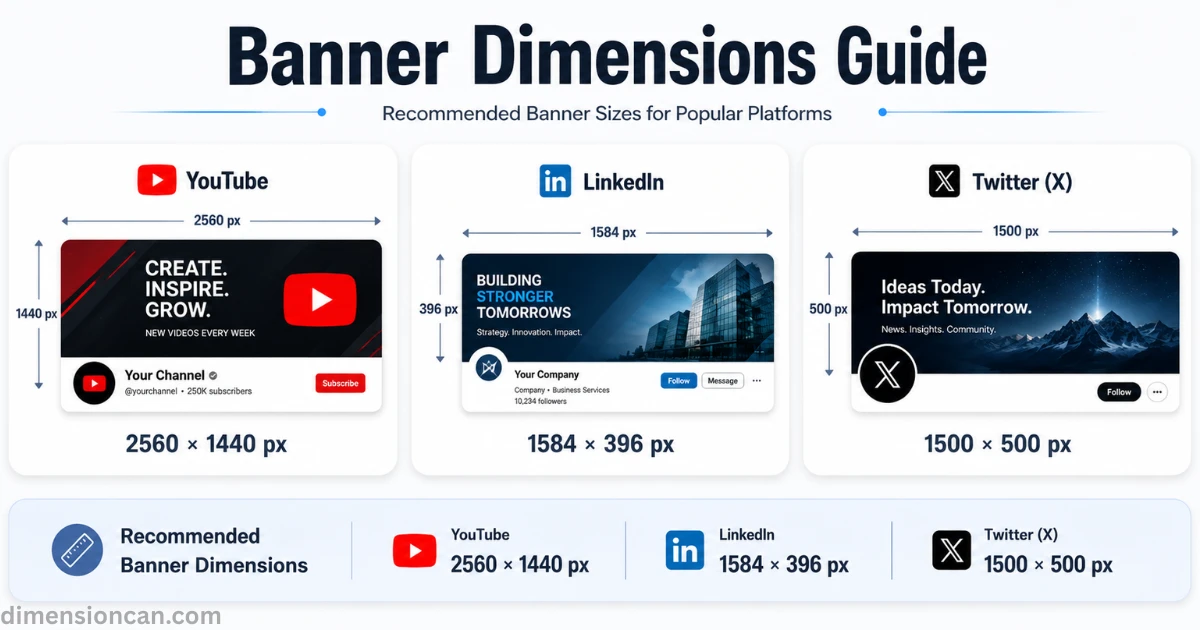
YouTube banners should be 2560 × 1440 px, LinkedIn banners 1584 × 396 px, and Twitter (X) banners 1500 × 500 px. Using the correct dimensions and safe zones keeps your banner sharp and prevents important text or logos from being cropped.
This guide breaks down the exact banner dimensions for every major platform, why the numbers matter, and how to avoid the mistakes that quietly hurt your brand.
Banner Dimensions at a Glance
| Platform | Recommended Size | Aspect Ratio | Max File Size |
|---|---|---|---|
| YouTube | 2560×1440 px | 16:9 | 6MB |
| LinkedIn (Personal) | 1584×396 px | 4:1 | 8MB |
| LinkedIn (Company Page) | 1128×191 px | ~6:1 | 4MB |
| Twitter (X) | 1500×500 px | 3:1 | 5MB |
Formats accepted across all three platforms are almost identical — JPG and PNG, with PNG preferred for text or logos since it avoids compression artifacts.
YouTube Banner Dimensions
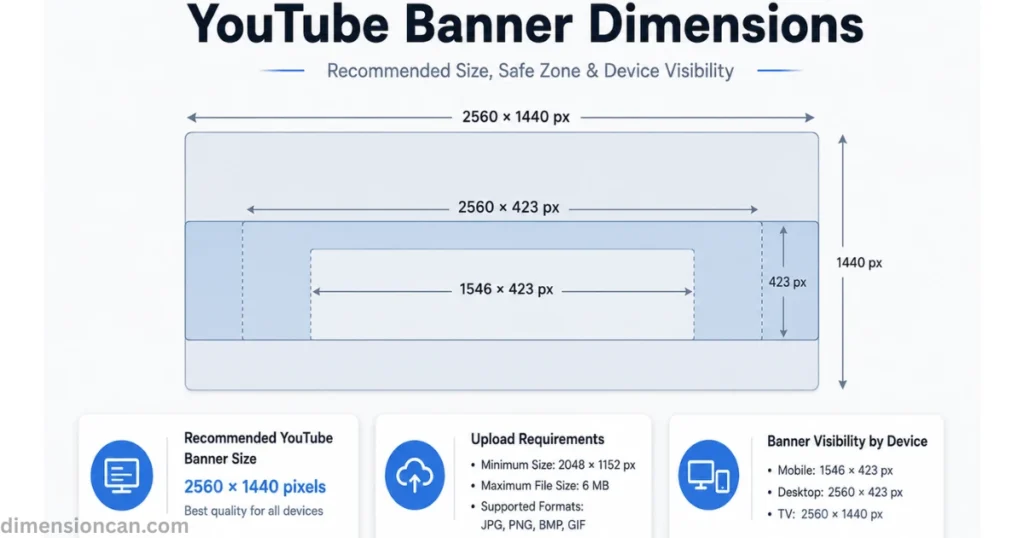
The recommended YouTube banner dimensions are 2560×1440 pixels, with a minimum upload size of 2048×1152 pixels and a 6MB file limit. YouTube accepts JPG, PNG, BMP, and GIF formats.
YouTube Banner Dimensions Safe Zone (Mobile vs. Desktop vs. TV)
The safe zone is the one region guaranteed to appear on every screen: 1546×423 px, centered inside the full canvas. Think of your banner as three layered rectangles:
- Mobile shows only the center strip — 1546×423 px
- Desktop shows a wider strip — 2560×423 px
- TV shows the entire canvas — 2560×1440 px
More Posts:YouTube Video Dimensions: The Complete Guide for Every Format
LinkedIn Banner Dimensions
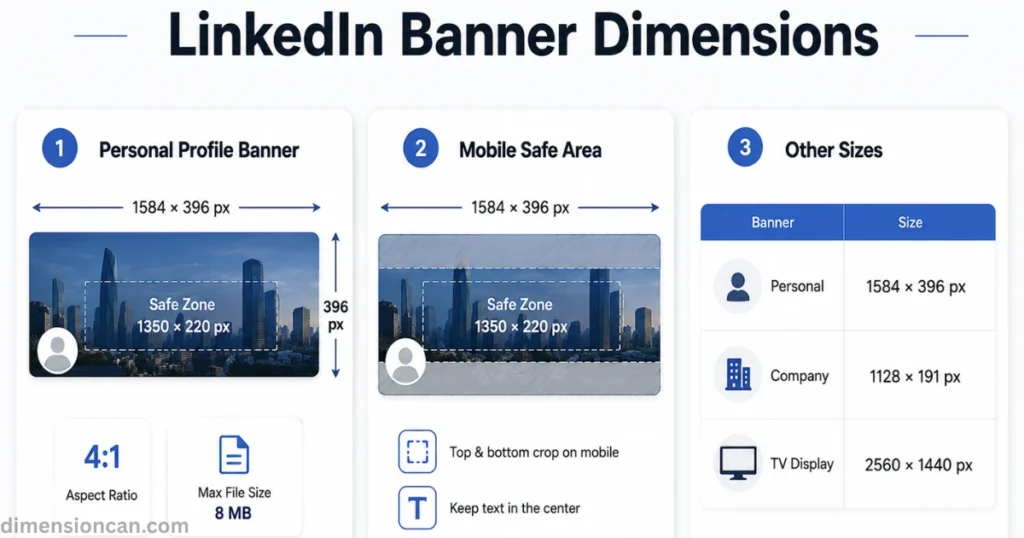
LinkedIn recommends 1584×396 pixels for a personal profile banner, a 4:1 aspect ratio, and an 8MB file cap. Company Pages use a different, narrower canvas.
LinkedIn Banner Dimensions Safe Zone & Cropping Behavior
LinkedIn’s safe zone sits at roughly 1350×220 px, centered in the full banner. On mobile, the top and bottom edges of your 1584×396 canvas get trimmed first, so any headline, tagline, or contact detail belongs near the vertical center of the image, not the edges.
Uploading an image smaller than 1584×396 causes stretching and pixelation. Uploading something far larger forces LinkedIn to auto-crop, often removing exactly the content you wanted visible.
Personal Profile vs. Company Page Banner Dimensions
A personal profile banner uses 1584×396 px. A Company Page banner, by contrast, uses a noticeably narrower canvas — roughly 1128×191 px — because Company Pages display additional elements (follower count, “Visit website” button) directly beneath the header.
Twitter (X) Banner Dimensions
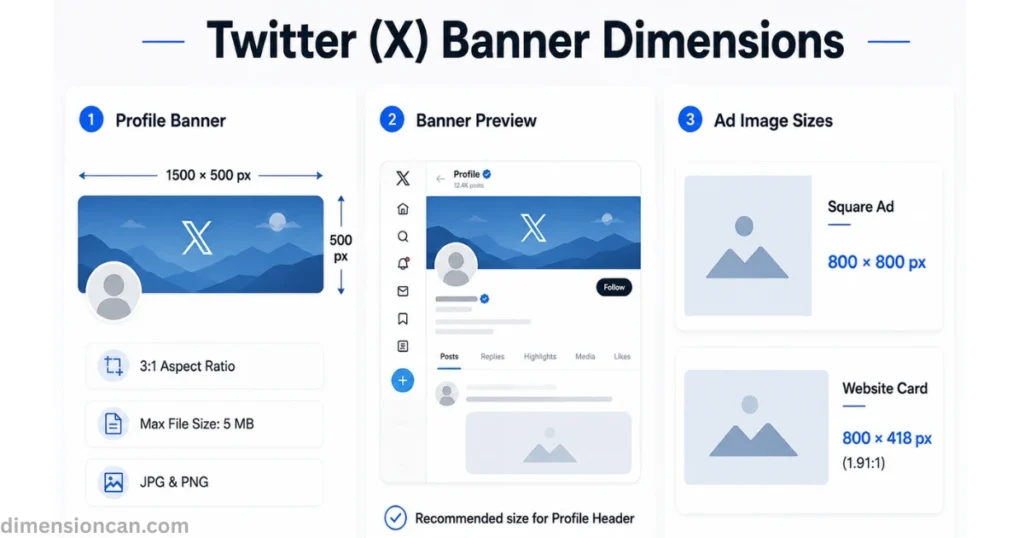
The recommended Twitter banner dimensions — often still called the “header image” — are 1500×500 pixels, a 3:1 aspect ratio, with a 5MB file limit. JPG and PNG are both supported.
Organic Twitter Banner Dimensions vs. Ad/Header Requirements
Organic profile headers and promoted content don’t share the same specs. A standard profile header uses 1500×500 px, but Twitter’s advertising formats — website cards, carousel ads — call for square (800×800 px) or 1.91:1 (800×418 px) images instead.
More Posts:Standard Bathtub Dimensions: A Complete Size Guide for Every Bathroom
Common Banner Dimensions Mistakes (and How to Fix Them)
Across all three platforms, the same handful of errors repeat. Fixing them takes minutes and prevents a blurry, cropped, or off-brand first impression.
Wrong Aspect Ratio & Stretching
Uploading an image that doesn’t match the platform’s required ratio forces the system to stretch, squeeze, or crop it automatically. A square image forced into a 4:1 or 3:1 frame will distort faces, logos, and text. Always design at the exact recommended banner dimensions rather than resizing an existing graphic after the fact.
Ignoring the Safe Zone on Mobile
Since most social traffic now comes from mobile devices, any banner designed only for a wide desktop view risks losing its message entirely once cropped. The fix is consistent across YouTube, LinkedIn, and Twitter: place your name, logo, and key message inside the platform’s safe zone, and treat everything outside it as purely decorative.
More Posts:iPhone Wallpaper Dimensions: The Complete 2026 Size Guide
FAQs About Banner Dimensions
What are the correct banner dimensions for YouTube, LinkedIn, and Twitter?
YouTube uses 2560×1440 px, LinkedIn personal profiles use 1584×396 px, and Twitter (X) uses 1500×500 px.
What is a “safe zone” in banner dimensions?
The safe zone is the center portion of a banner that stays visible across every device. Content outside it may be cropped on mobile or tablet screens.
Can I use the same banner dimensions across all platforms?
No. Each platform uses a different aspect ratio and safe zone, so a single image rarely fits all three without cropping or stretching somewhere.
What happens if I upload the wrong banner dimensions?
The platform will either stretch a small image (causing blur) or crop a large one (cutting off text and logos), depending on which direction the mismatch runs.
What file size and format should banner dimensions be saved in?
PNG works best for logos and text; JPG suits photographic backgrounds. File limits range from 5MB (Twitter) to 8MB (LinkedIn personal profiles).
How do I check my banner dimensions before publishing?
Most platforms show a live preview before you confirm the upload — YouTube Studio, LinkedIn’s profile editor, and Twitter’s header uploader all display how the image will crop across devices.
Conclusion
Getting your banner dimensions right isn’t a design afterthought — it’s the difference between a profile that looks intentional and one that looks stretched or cropped by accident.
YouTube, LinkedIn, and Twitter each use their own canvas size and safe zone, so the same image rarely transfers cleanly between platforms. Build each banner at its exact recommended size, keep essential text and logos inside the safe zone, and preview before publishing. That’s the entire formula — no guesswork required.

James Walker is a content researcher and writer specializing in dimensions, measurements, size comparisons, and conversion topics. He creates clear, practical, and easy-to-understand guides that help readers visualize and understand real-world measurements.