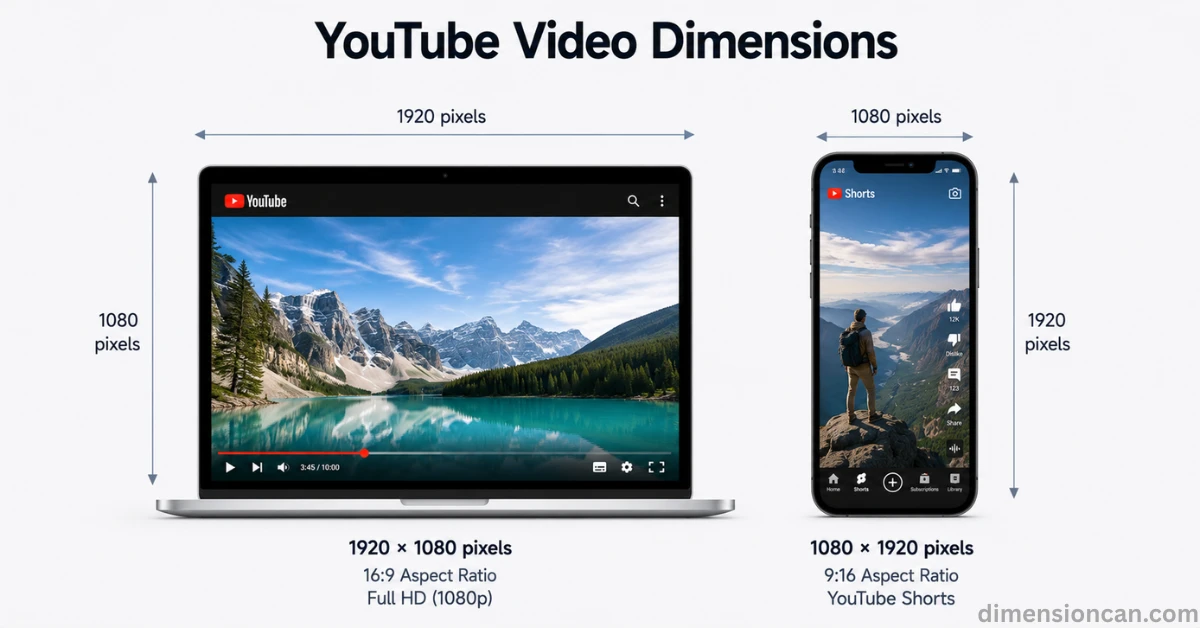
The best YouTube video dimensions for most uploads are 1920 × 1080 pixels with a 16:9 aspect ratio. This is called Full HD and is the standard size YouTube recommends for regular videos. For YouTube Shorts, use 1080 × 1920 pixels with a 9:16 vertical aspect ratio.
Getting your video dimensions wrong can hurt your channel. Wrong sizes create black bars, blurry frames, or cropped faces. This guide breaks down every format YouTube supports, the mistakes creators make, and the exact settings you need for.
What Are YouTube Video Dimensions?
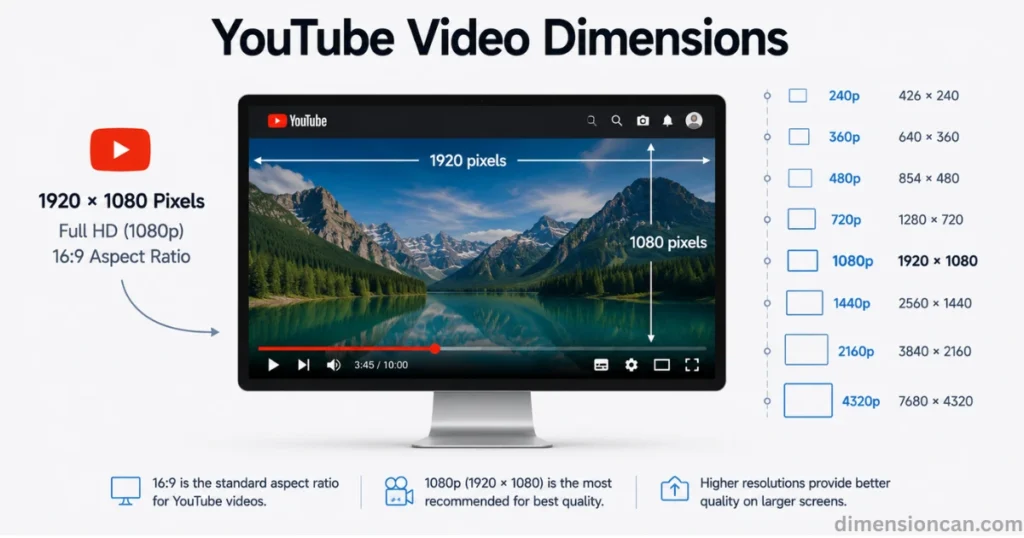
Video is 1920×1080, they mean it is 1920 pixels wide and 1080 pixels tall. Multiply those two numbers and you get over 2 million pixels in a single frame. That is what gives Full HD video its crisp look.
Resolution and aspect ratio are related but not the same thing. Resolution is the pixel count. Aspect ratio is the shape of the frame, expressed as a ratio like 16:9 or 9:16. YouTube’s video player is built around 16:9, which is why horizontal videos look best in that shape.
More Posts:Standard Door Dimensions: A Complete Size Guide (Height, Width & Thickness)
YouTube Video Dimensions Chart
| Video Quality | Resolution (Pixels) | Description |
|---|---|---|
| 240p | 426 × 240 | Lowest quality, useful only for very slow internet connections. |
| 360p | 640 × 360 | Common for embedded videos and mobile data saving. |
| 480p | 854 × 480 | Standard Definition (SD), acceptable for casual mobile viewing. |
| 720p | 1280 × 720 | Minimum quality YouTube considers HD. |
| 1080p | 1920 × 1080 | Full HD, the recommended size for almost every creator. |
| 1440p | 2560 × 1440 | Also called 2K or QHD, popular with gaming and professional channels. |
| 2160p | 3840 × 2160 | Known as 4K Ultra HD, widely used by modern creators. |
| 4320p | 7680 × 4320 | Also called 8K, supported by few devices today but designed for future-proofing. |
Why the Right Dimensions Matter for Reach
YouTube’s algorithm pays attention to video quality. According to YouTube’s own creator resources, higher resolution uploads tend to perform better in recommendations because they hold viewer attention longer. Sharper video keeps people watching, and watch time is one of the biggest ranking signals on the platform.
Poor dimensions also cause a technical problem called pillarboxing, where black bars appear on the sides of your video because the shape does not match YouTube’s player. This makes your content look unprofessional, even if the footage itself is good.
Best YouTube Video Dimensions for Every Content Type
Standard YouTube Video Dimensions
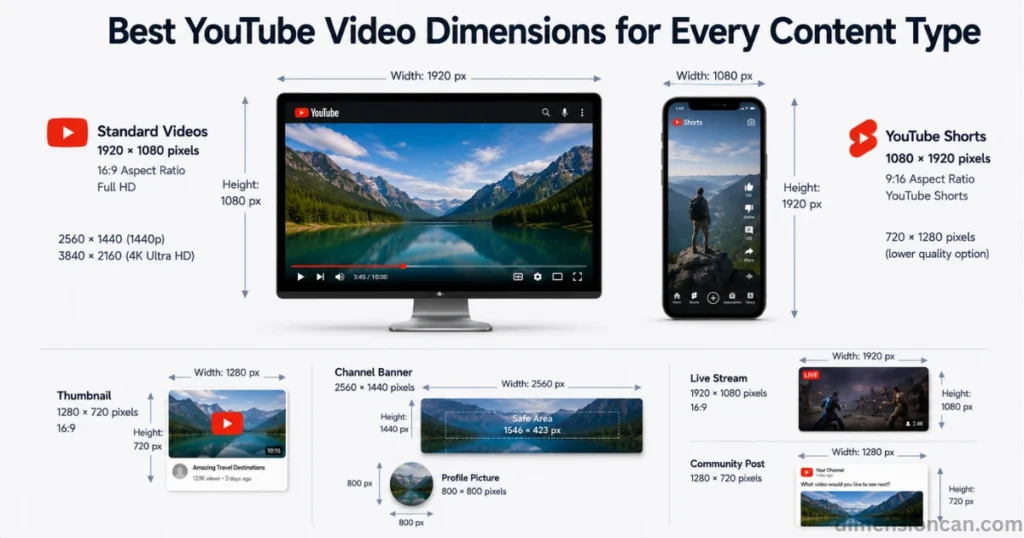
For regular, long-form videos, upload at 1920×1080 with a 16:9 aspect ratio. This is the safest and most widely supported choice.
If you have the storage and bandwidth, 1440p or 4K gives you a sharper image and more room to crop or zoom during editing without losing quality. Many tech reviewers, gaming channels, and travel vloggers now film in 4K even if most viewers watch in 1080p.
A smart habit is to record in 4K but upload in 1080p when your internet is slow. You keep a high-quality master file while still getting a fast, smooth upload.
YouTube Shorts Dimensions
YouTube Shorts require a vertical frame. The correct Shorts dimensions are 1080×1920 pixels, giving a 9:16 aspect ratio. This is the same shape used by TikTok and Instagram Reels.
A horizontal video will not qualify as a Short, even if it is under a minute long. YouTube checks the aspect ratio, not just the length.
720×1280 is technically accepted as a lower quality option, but it is not recommended. Viewers scroll fast, and a blurry Short loses attention within seconds.
YouTube Thumbnail Dimensions
Thumbnails should be 1280×720 pixels, matching the 16:9 shape of the video player. Keep the file under 2MB. Use JPG for photo-based thumbnails and PNG if your design includes text or graphics with sharp edges.
Remember that YouTube also displays thumbnails as small as 196×110 pixels in sidebar suggestions. Test your design at a small size before publishing, since tiny text often becomes unreadable.
YouTube Channel Banner and Profile Dimensions
Most guides skip this, but banner size matters just as much as video size for branding. The ideal channel banner size is 2560×1440 pixels. However, YouTube crops this image differently depending on the device, so keep your logo, text, and key visuals inside the safe area of roughly 1546×423 pixels in the center.
Your profile picture should be 800×800 pixels, saved as JPG, PNG, or GIF, and under 4MB.
YouTube Live Stream and Community Post Dimensions
Live streaming on YouTube works best at 1920×1080, the same as standard uploads, with a stable 16:9 frame throughout the broadcast. Changing your resolution mid-stream can cause buffering or a temporary drop in stream quality.
For community post images, YouTube recommends 1280×720 pixels. Square images also work well since they display fully in the feed without cropping.
More Posts:Pokemon Card Dimensions: The Complete Size Guide
How to Set the Right YouTube Video Dimensions
Best Export Settings
Use the MP4 file format with the H.264 codec for the best balance of quality and file size. Pair your resolution with the correct frame rate, usually 24, 30, or 60 frames per second, depending on your content style. Gaming and sports content often looks smoother at 60fps, while storytelling content works fine at 24 or 30fps.
For audio, YouTube recommends the AAC-LC codec at 48kHz.
Tools to Resize Your Video
Free tools like DaVinci Resolve and paid software like Adobe Premiere Pro both include built in aspect ratio presets for YouTube, Shorts, and other platforms. Most editing software lets you set your canvas size before you even start editing, which saves time later.
Filming in 4K vs Uploading in 1080p
Filming in 4K gives you flexibility. You can crop, zoom, or reframe your shot in editing without losing sharpness in the final 1080p export. This technique, sometimes called punch in editing, is popular among interview and documentary style creators who want options without shooting multiple angles.
FAQ’s
Is a YouTube video 1920×1080?
Yes. 1920×1080 is the most common and recommended size for standard YouTube videos, offering Full HD quality with a 16:9 aspect ratio.
Is YouTube 16×9 or 4×3?
YouTube’s standard shape is 16:9. Older 4:3 videos still upload fine, but they display with black bars on the sides.
What size is a 1920×1080 video frame?
A 1920×1080 frame is 1920 pixels wide and 1080 pixels tall, totaling just over 2 million pixels per frame.
What are the dimensions of a YouTube video?
YouTube supports sizes from 426×240 up to 7680×4320. The recommended size is 1920×1080 for regular videos and 1080×1920 for Shorts.
Which is better, 4:3 or 16:9?
16:9 is better for YouTube. It fills the entire screen without black bars and matches the platform’s native player shape.
How to convert 16:9 video to 9:16?
Use video editing software to crop or reframe your footage into a vertical shape. Most editors include ready made vertical presets for this exact conversion.
Is 1.33 the same as 4:3?
Yes. 1.33:1 and 4:3 describe the same shape. It was the standard for older televisions before 16:9 became common.
Is 1080p 4:3 or 16:9?
1080p almost always means 16:9. While a 4:3 version at that height is technically possible, the term 1080p universally refers to the widescreen Full HD standard.
Is 4K 4096 or 3840?
For YouTube, 4K means 3840×2160 pixels, known as UHD. The 4096 version is called DCI 4K and is used mainly in cinema production, not online video.
Conclusion
Choosing the right YouTube video dimensions is one of the simplest ways to improve how your content looks and performs. Stick with 1920×1080 for standard videos, 1080×1920 for Shorts, and always keep your aspect ratio at 16:9 unless you are making vertical content.
Pixel count matters, but so does consistency. Match your banner, thumbnail, and profile picture sizes to YouTube’s guidelines, and your channel will look polished across every device your audience uses.

James Walker is a content researcher and writer specializing in dimensions, measurements, size comparisons, and conversion topics. He creates clear, practical, and easy-to-understand guides that help readers visualize and understand real-world measurements.